
Case study
Bespoke Sales CRM
Meet someone.
Capture the lead.
Keep it moving.
A mobile-first CRM built for networking. Turn a business card photo or a quick conversation note into a sales lead in seconds.
AI capture Business card scanning Lead ownership Calendar integration
Designed and developed by WebDevBuilders
Built for WebDevBuilders.
Designed for sales on the go.
The best time to capture a lead is while the conversation is still fresh.
The challenge
Good conversations needed a better follow-up.
Our team meets potential customers at networking events, on calls and between meetings, often with only a phone to hand.
The details were captured once, then typed into a CRM later, field by field. Business cards sat in pockets, notes were scattered and handing a lead to a colleague depended on remembering to tell them.
We needed a sales system that fitted the way relationships begin: a conversation, a business card and a clear next step.
Too much typing after the event
Names, contact details and project notes had to be entered again before the opportunity could be actioned.
Context was easy to lose
A business card held the contact details, but not what was discussed, the budget or what had been promised.
Follow-up relied on memory
Lead ownership, reminders and meeting arrangements involved separate steps and manual handovers.
Business card to sales lead
Take a photo.
Add a lead in seconds.
Photograph a business card with the phone camera and let the CRM read the contact details.
At a conference, a networking breakfast or between meetings, the lead can be recorded before the card goes back into a pocket.
Photograph the card
Capture the business card directly from your phone. The CRM reads the name, email, phone number, job title and company.
Check the details
The extracted information appears in an editable panel, ready to review and correct before saving.
Save the lead
Create the contact and linked sales lead, with the original card image kept on the record for reference.
What we built
One quick note.
A complete sales record.
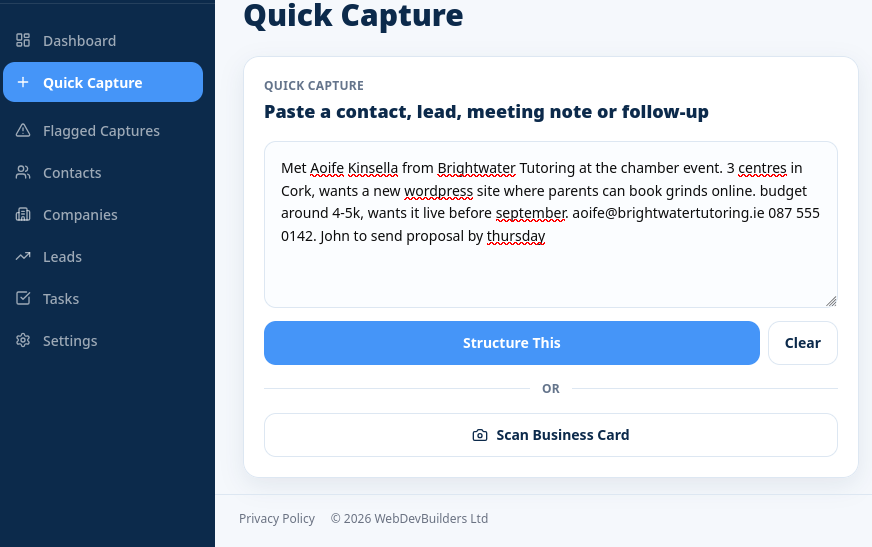
Quick Capture is one tap away. Type or paste a note as you would say it: who you met, what they need, their budget and who should follow up. AI structures the information, then shows an editable preview before anything is saved.
The contact
Name, email and phone details become a contact, with checks for an existing name or email.
The company
The organisation is captured and connected to the conversation.
The opportunity
Requirements, service interests and potential value become a structured sales lead.
The owner
A colleague named in the note can be matched to a real team member.
The next step
A follow-up task records what needs to happen and who should do it.
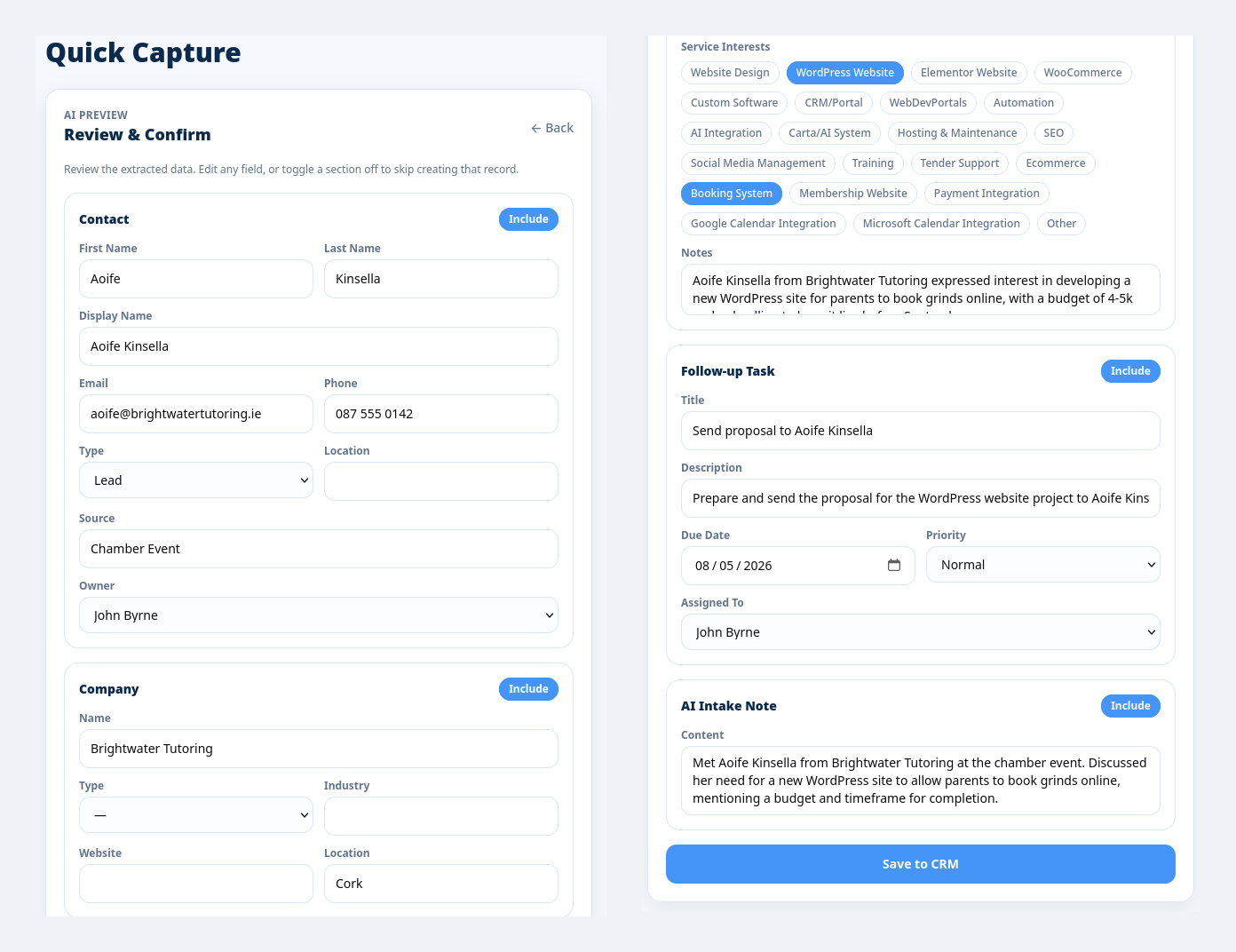
AI suggests. The person approves. Each section can be included, edited or skipped before saving.
From capture to follow-up
A lead with context.
A clear next action.
When a lead is assigned, the owner receives an email with a direct link and a task to action it. The record keeps the contact, company, value, service interests and conversation notes together, so a colleague can pick it up with the background already in place.
The conversation stays with the lead.
Contact details, company information, service interests, potential value and notes are kept together.
The right person is notified.
Assign a lead at creation or later, and the owner receives an email linking directly to the record.
The next step is recorded.
A follow-up task gives the responsible team member a clear action to move the opportunity forward.
Built around the team
Easy to use on the move. Controlled behind the scenes.
Mobile-first from the start
Every screen is designed for a phone first and a desktop second. Quick Capture is always close to hand, and contact details can be tapped to call or email.
Meetings without retyping
Each user connects their own Google Calendar. Book a video call or in-person meeting from the contact or lead, send the invite and retain the meeting in the record history.
Review before saving
Extracted details remain editable. Duplicate checks help avoid repeated contacts, while failed captures are retained and flagged for review.
Permissions and data controls
Admin, team member and viewer roles control access, with permissions checked on the server. Login protections, encrypted credentials and tokens, and personal-data export and erasure support responsible administration.
The result
Less admin between meeting someone and following up.
The CRM brings networking, lead capture and sales follow-up into one workflow. A card or conversation becomes a usable record while the details are fresh, with an owner, supporting context and a next step.
Leads on the spot
Record a new opportunity from a phone during the event or straight after the conversation.
Cards become contacts
Read details from a card photo and keep the original image attached to the lead.
Ownership is clear
The person responsible receives a notification and a task to move the lead forward.
Meetings stay connected
Book once and keep the appointment in both the calendar and the CRM history.
Technology used
Capture it once
Turn your next conversation into a clear next step.
If your sales team spends time networking, visiting customers or following up after events, we can build a CRM around the way they work. Get in touch to see the system in action.